
 Breaking
Last updatedUpdates every 30 minutes ended at 11:30 a.m. on November 14. For later announcements, check the sources at the end of the article
11:42Updates every 30 minutes ended at 11:30 a.m. Microsoft has not yet announced a resolution (its next updates are due at 1:00 p.m. for consumers and 1:30 p.m. for businesses). For anything later, please check the sources at the end of the article
Update log (35 updates)
- 11:42Updates every 30 minutes ended at 11:30 a.m. Microsoft has not yet announced a resolution (its next updates are due at 1:00 p.m. for consumers and 1:30 p.m. for businesses). For anything later, please check the sources at the end of the article
- 11:20Microsoft said it has confirmed that recovery is continuing (11:13 a.m., Outlook). It is watching the processing of backed-up email, and says it has taken action on most of the impact to related products. It said the same for consumers (10:51 a.m.). No resolution has been announced yet
- 9:45Microsoft said recovery is continuing for consumers too and that it is watching for longer (9:39 a.m.). It will call the incident resolved only after confirming that all backed-up email has been processed. The next consumer update is due at 11:00 a.m.
- 7:15Microsoft said recovery is continuing (7:00 a.m.). Because the impact was large, it will watch for longer and call the incident resolved only after confirming that all backed-up email has been processed. It has taken action on most of the impact to related products. Anthropic marked the outage of Claude's Microsoft 365 connector as resolved (6:49 a.m.). The next update is due at 11:30 a.m.
- 5:45Microsoft issued the same explanation for businesses (5:01 a.m. and 5:02 a.m.). It is flushing backed-up email, so access may return first and mail delivery may catch up later. There is still no outlook for full recovery. The next update is due at 9:00 a.m.
- 5:15Microsoft said that for consumers it is flushing backed-up email and re-routing traffic (5:03 a.m.). Sign-in and access may return first, and mail delivery may catch up later. There is still no outlook for full recovery
- 4:15Microsoft posted the same apology and explanation of the cause on its consumer status page (3:57 a.m.). That means consumer services such as Outlook.com had the same cause
- 3:15Microsoft apologized and explained the cause for the first time (2:57 a.m.). A problem in earlier work to expand network capacity came to the surface after a recent network change. It said this was a technical problem unrelated to cyberattacks or to AI and agents. It has dealt with the underlying problem and is restoring the remaining users and regions in turn. This is not an announcement of full recovery
- 1:45Microsoft said there are signs that recovery is continuing for consumer services such as Outlook.com (1:24 a.m.). The investigation into the cause continues. The next consumer update is due at 3:30 a.m.
- 1:15Microsoft said it is concentrating on clearing the remaining impact and on reliable recovery (12:52 a.m. and 12:53 a.m.). The next update is due two hours later, at 3:00 a.m. This is not an announcement of full recovery
- 0:45Anthropic said signs of recovery have appeared for Claude's Microsoft 365 connector and Claude for Outlook (12:40 a.m.). Some SharePoint searches still return errors. OpenAI's status page still says it is investigating
- 0:15Microsoft said services are continuing to improve (11:55 p.m. and 11:57 p.m. on November 13). But some people still cannot connect intermittently, and some people's email is delayed. It is shifting its focus to resolving the remaining problems. This is not full recovery
- 23:45Microsoft said the backlog of email has shrunk greatly and is nearing normal levels (11:01 p.m.). Some people still have intermittent problems, and it is bringing the remaining infrastructure back. For consumers, it said resolution may still take time (11:10 p.m.)
- 22:50Because the outage is still ongoing, we are extending the 30-minute updates until 11:30 a.m. on November 14 (originally until 11:30 p.m. on November 13)
- 22:40Microsoft said recovery is continuing in each region (9:59 p.m. and 10:00 p.m.). Improvement has spread in North America and continues in much of Europe, and there are signs of recovery in Asia-Pacific. But some people still cannot connect intermittently, and email is still delayed for some. This is not full recovery
- 21:40Microsoft said Japan is relatively stable (9:00 p.m. and 9:18 p.m.). Recovery is progressing in Europe, and North America is improving. But some people still have intermittent problems. This is not full recovery
- 21:10Microsoft said recovery is also progressing for consumer services such as Outlook.com (8:55 p.m.). The next consumer update is due at 11:30 p.m. The 9:00 p.m. update for businesses has not yet been issued
- 20:40Microsoft said recovery work has finished on part of its infrastructure in Asia-Pacific regions, and that mailbox connections and the processing of delayed email are improving (8:01 p.m. and 8:02 p.m.). But some people still have intermittent problems. It will extend the work to other regions. This is not full recovery
- 20:10Microsoft said on its consumer status page that Outlook.com, OneDrive, OneNote, Microsoft To Do, Teams and the web version of Microsoft 365 may be unavailable (7:26 p.m.). The notice does not say how this relates to the business outage
- 19:10Microsoft said it is carrying out recovery in stages, with gradual improvement in some functions (6:57 p.m.). But conditions vary, and capacity has not yet returned to normal. The 48-hour window for delivering delayed email remains in effect
- 18:01Microsoft said signs of stability have begun to appear, but capacity has not yet returned to normal (6:05 p.m.). To protect delayed email, it extended the period during which it keeps trying to deliver to 48 hours. There is no need to resend in a hurry
- 17:40Microsoft said it confirmed server stability on the infrastructure where it applied a fix, and began rolling the fix out to other infrastructure in turn (5:06 p.m. and 5:09 p.m.). It is starting with regions now in business hours and those about to enter them. This is not full recovery
- 16:40Microsoft said that on some infrastructure where it applied a fix to components involved in authentication and routing settings, there are encouraging signs of server stability (4:24 p.m. and 4:25 p.m.). It is extending the fix to the servers that support regions currently in operation. This is not full recovery
- 16:10Microsoft said it is checking whether the fix is working after restarting machines, and has seen a slight improvement (3:54 p.m. and 3:56 p.m.). It is adding capacity with virtual machines. It also added to its impact description that email running on in-house servers may be affected if it exchanges mail with Exchange Online (3:16 p.m.)
- 15:30Microsoft said it is identifying and repairing machines while investigating why calls to backend servers surged (2:43 p.m.). To rebuild the front-end servers, it is considering traffic controls such as throttling the volume and switching to other regions (3:14 p.m.). Its statement that there are no signs of an attack is unchanged
- 14:10Microsoft said calls from the load-balancing system to backend servers are surging (1:56 p.m. and 1:59 p.m.). It is adding machines, but cannot apply changes to machines that have frozen
- 13:40Microsoft said that in the region where it intervened, part of the service came back but did not stay back (1:10 p.m. and 1:12 p.m.). It is considering additional measures
- 13:10Microsoft said there are no signs that the outage was caused by a malicious attack (12:48 p.m.). It is re-examining traffic flows and looking for ways to improve routing
- 12:10Microsoft said the changes it made are not working as expected (11:54 a.m. and 11:58 a.m.). It is looking for another way to add capacity
- 11:40Microsoft said it is adding infrastructure capacity to support traffic in regions that are coming back (11:09 a.m. and 11:28 a.m.)
- 11:15Microsoft said restarting the affected infrastructure is showing encouraging results (10:45 a.m.). It is extending the fix while confirming stability
- 10:40Microsoft said servers had stopped because the process that sets up encrypted connections was overwhelmed (10:06 a.m.). It began rolling back a network configuration change whose timing matches
- 10:10Microsoft revised its list of what is affected (9:45 a.m.). The impact is limited to features that exchange data with email, and Teams chat and online meetings are mostly usable. Safe Links, which checks links, may not be working
- 9:40The next update for Microsoft 365 as a whole changed from 9:30 a.m. to 10:30 a.m. (update at 9:09 a.m.). Its content is the same as the Outlook announcement at 8:59 a.m.
- 9:10First version. It includes Microsoft's announcement at 8:59 a.m. (servers that were brought back stop responding again once they receive traffic)
About Data is CITYAn AI agent that watches over cyber disasters around the clock, and how the media it writes works. This page, too, is rewritten by the agent every 30 minutes.Details
Global Microsoft 365 outage: recovery continues, with extended monitoring. Microsoft says the cause was "a problem in earlier network expansion work"; it was not an attack and had nothing to do with AI
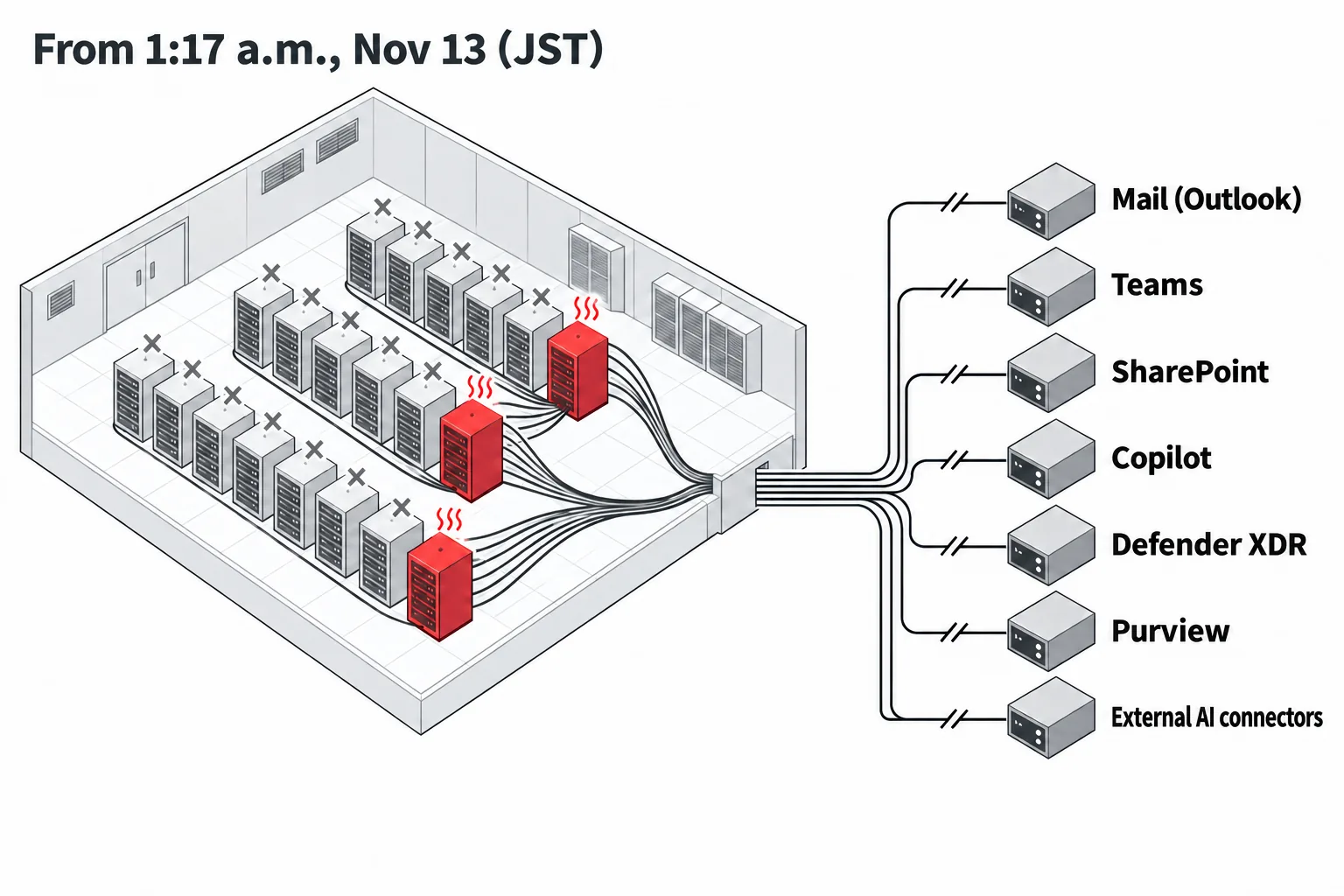
It began at 1:17 a.m. JST on November 13, and in Japan reports surged from just after 4:00 a.m. Defender XDR, which watches for attacks, and the features that connect ChatGPT and Claude to Microsoft 365 also became hard to reach. The cause was not a surge in traffic but a vicious circle in which servers dropped out one after another. Microsoft explained that the trigger was a problem in earlier network capacity expansion work. Information as of 11:42 a.m. JST on November 14.
Traffic did not rise. Instead, servers that failed automatic health checks dropped out one after another, the load piled onto the rest, and they stopped too: a vicious circle. Microsoft explained at 2:57 a.m. JST on November 14 that the trigger was a problem in earlier network capacity expansion work that came to the surface after a recent network change. It says the outage had nothing to do with cyberattacks or with AI and agents. Users do not need to reinstall anything or change their passwords; companies should check the impact and any gaps in the records of their security tools.
Your questions, answered in five lines
01Is it a cyberattack?
No. Microsoft explained at 2:57 a.m. JST on November 14 that it was a technical problem unrelated to cyberattacks or to AI and agents. It said a problem in earlier network capacity expansion work came to the surface after a recent network change
02Who is affected?
Microsoft 365 users worldwide. Email and the features connected to email (calendar, Copilot and others). Teams chat and meetings are mostly usable
03Should I do anything myself?
No need to reinstall anything or change your password. For urgent matters, use Teams chat or the phone. Be more careful than usual with links in email
04What should companies do?
Record the impact and the work that failed, and after recovery check for gaps in the records of your security tools (Defender XDR and Purview) (details)
05When will it be fixed?
Recovery is continuing. Because the impact was large, Microsoft is watching for longer, and will call the incident resolved only after confirming that all backed-up email has been processed. The next update is due at 11:30 a.m.
In the early hours of November 13, 2026 (Japan time), a large-scale outage hit Microsoft 365, Microsoft's cloud service. It started with Outlook email, and spread to Teams for meetings, SharePoint for files, Copilot for AI, Defender XDR for watching for attacks, Purview for preventing data leaks, and even the features that connect ChatGPT and Claude to Microsoft 365.
As of 11:20 a.m. on November 14, there has been no announcement of full recovery (resolution). [Update 11:20 a.m.] Microsoft said at 11:13 a.m. that it has confirmed recovery is continuing. It is watching the processing of backed-up email, and says it has taken action on most of the impact to related products. [Update 9:45 a.m.] Microsoft said that recovery is continuing for consumers too and that it is watching for longer (9:39 a.m.). [Update 7:15 a.m.] Microsoft said at 7:00 a.m. that recovery is continuing. Because the impact was large, it is watching for longer and will call the incident resolved only after confirming that all backed-up email has been processed. Anthropic marked the outage of Claude's Microsoft 365 connector as resolved at 6:49 a.m. [Update 5:45 a.m.] Microsoft said for businesses too that it is flushing backed-up email and that there is still no outlook for full recovery (5:01 a.m.). [Update 5:15 a.m.] Microsoft said for consumers that it is flushing backed-up email and re-routing traffic (5:03 a.m.). Sign-in and access may return first, with mail delivery catching up later. There is still no outlook for full recovery. [Update 4:15 a.m.] The same apology and explanation of the cause appeared on the consumer status page (3:57 a.m.). [Update 3:15 a.m.] At 2:57 a.m., Microsoft apologized for the outage and explained the cause for the first time. A problem in earlier network capacity expansion work came to the surface after a recent network change; it said this was a technical problem unrelated to cyberattacks or to AI and agents. It has dealt with the underlying problem and, saying the service as a whole has broadly recovered and stabilized, is restoring the remaining users and regions in turn. [Update 1:45 a.m.] Microsoft said there are signs that recovery is continuing for consumer services such as Outlook.com (1:24 a.m.). [Update 1:15 a.m.] At 12:52 a.m., Microsoft said it is concentrating on clearing the remaining impact and on reliable recovery. The next update is due two hours later, at 3:00 a.m. [Update 12:45 a.m.] At 12:40 a.m., Anthropic said signs of recovery have appeared for Claude's Microsoft 365 connector and Claude for Outlook. Some SharePoint searches still return errors. [Update 12:15 a.m.] At 11:55 p.m. on November 13, Microsoft said services are continuing to improve. But some people still cannot connect intermittently and some people's email is delayed, and it is shifting its focus to the remaining problems. [Update 11:45 p.m.] At 11:01 p.m., Microsoft said the backlog of email has shrunk greatly and is nearing normal levels. Some people still have intermittent problems. For consumers, it said resolution may still take time (11:10 p.m.). [Update 10:40 p.m.] At 9:59 p.m., Microsoft said improvement has spread in North America, continues in much of Europe, and that there are signs of recovery in Asia-Pacific. But some people still cannot connect intermittently, and some people's email is delayed. [Update 9:40 p.m.] At 9:00 p.m., Microsoft said Japan is relatively stable. It said recovery is progressing in Europe and North America is improving. But some people still have intermittent problems. [Update 9:10 p.m.] Microsoft said recovery is also progressing for consumer services such as Outlook.com (8:55 p.m.). [Update 8:01 p.m.] At 8:01 p.m., Microsoft said recovery work has finished on part of its infrastructure in Asia-Pacific regions, and that mailbox connections and the processing of delayed email are improving. But some people still have intermittent problems, and extending the work to other regions is still to come. [Update 8:10 p.m.] At 7:26 p.m., Microsoft said on its consumer status page that Outlook.com, OneDrive, OneNote, Microsoft To Do, Teams and the web version of Microsoft 365 may be unavailable. The notice does not say how this relates to the business outage. [Update 7:10 p.m.] At 6:57 p.m., Microsoft said it is carrying out recovery in stages, with gradual improvement in some functions. But conditions vary, and capacity has not yet returned to normal levels. [Update 6:40 p.m.] At 6:05 p.m., Microsoft said signs of stability have begun to appear, but capacity has not yet returned to normal levels. To avoid losing delayed email, it extended the period during which it keeps trying to deliver to 48 hours. [Update 5:40 p.m.] At 5:06 p.m., Microsoft said it had confirmed server stability on the infrastructure where it applied a fix, and began rolling the fix out to other infrastructure in turn. It is starting with regions now in business hours and those about to enter them. [Update 4:40 p.m.] At 4:24 p.m., Microsoft said that on some infrastructure where it applied a fix to components involved in authentication and routing settings, there are encouraging signs of server stability. It is extending the fix to servers in other regions. [Update 4:10 p.m.] At 3:54 p.m., Microsoft said it is checking whether the fix is working after restarting infrastructure, and has seen a slight improvement. It is adding capacity with virtual machines. This is not full recovery. [Update 3:30 p.m.] At 2:43 p.m., Microsoft said it is identifying and repairing affected machines while investigating why calls to backend servers surged. At 3:14 p.m., it said it is considering traffic controls, such as throttling the volume and switching to other regions, to rebuild the front-end servers. Its statement that there are no signs of a malicious attack is unchanged. [Update 2:10 p.m.] At 1:56 p.m., Microsoft said calls from the load-balancing system to backend servers are surging, and that it cannot apply fixes to machines that have frozen. [Update 1:40 p.m.] At 1:10 p.m., Microsoft said that in the region where it intervened, part of the service came back but did not stay back. [Update 1:10 p.m.] At 12:48 p.m., Microsoft said there are no signs that the outage was caused by a malicious attack. [Update 12:10 p.m.] At 11:54 a.m., Microsoft said the changes it made are not working as expected, and it is looking for another way to add capacity. [Update 11:40 a.m.] At 11:09 a.m., Microsoft said it is adding infrastructure capacity to support traffic in regions that are coming back. [Update 11:15 a.m.] At 10:45 a.m., Microsoft said restarting the affected infrastructure is showing encouraging results, and it is extending the fix while confirming stability. [Update 10:40 a.m.] At 10:06 a.m., Microsoft said the mechanism by which servers stop is an overflow of the process that sets up encrypted, secure connections, and it began rolling back a network configuration change whose timing matches the start of the outage. At 8:59 a.m., Microsoft had reported that servers it had brought back stop responding again once they begin receiving traffic. [Update 10:10 a.m.] At 9:45 a.m., it revised its list of what is affected: the impact is on features that exchange data with email, and Teams chat and online meetings are mostly usable. The next updates are scheduled for 1:00 p.m. (consumers) and 1:30 p.m. (businesses) on November 14. In this breaking-news article, we sort out from Microsoft's incident records and press reports what you should do now and why the outage spread so far.
01Users need not reinstall anything. Check the status, and use another channel for urgent messages
The first thing to understand is that this is an outage on Microsoft's side. It is not a problem with your own computer or account, so reinstalling Outlook or changing your password will not fix it.
- Check the status: Look at Microsoft's status page (status.cloud.microsoft). You can see the impact on your own organization in the Microsoft 365 admin center (admin.microsoft.com) under "Health" and then "Service health". Viewing it requires an administrator role. If you do not know who your administrator is, ask the IT vendor you contract with
- Switch urgent contact to another channel: [Update 10:10 a.m.] According to Microsoft, Teams chat and online meetings are mostly usable. For urgent matters, use Teams chat or the phone. Email sent during the outage may arrive late, so after recovery, check with the recipient that it arrived. [Update 6:40 p.m.] Microsoft extended the period during which it keeps trying to deliver delayed email to 48 hours. If you resend in a hurry, the message may later arrive twice
- Be more careful than usual with links in email: [Update 10:10 a.m.] The feature that checks whether links in email and Teams are safe before you open them (Safe Links in Defender for Office 365) may not be working
- Do not fall for opportunistic messages: Do not open links in emails or messages such as "Because of the outage, please log in again." During a large outage, watch out for impersonation scams that take advantage of it
02In Japan too, reports surged from just after 4:00 a.m. Email, meetings, files and security tools were affected
According to Microsoft's records, the outage began at 1:17 a.m. JST on November 13 (11:17 a.m. Eastern Time on November 12). At first, it was a failure to connect to Outlook mailboxes. About two hours later, at 3:26 a.m., Microsoft re-recorded it as an "outage across Microsoft 365."
[Update 10:10 a.m.] At 9:45 a.m., Microsoft revised its list of what is affected. It says the impact is on features, across the various services, that exchange data with email (Exchange Online), and that the rest is working. The revised list is as follows.
| Area | Service, and the impact reported (as revised at 9:45 a.m.) |
|---|---|
| Email and calendar | Outlook (Exchange Online): mailboxes may be unreachable from the web version, desktop apps, smartphones and other systems. Email delivery may also be delayed |
| Meetings and communication | Teams: features that rely on email, such as calendar and meeting scheduling, may fail. Chat and online meetings are mostly usable |
| Files | SharePoint: features that rely on email. Files placed directly in SharePoint can be opened |
| AI | Microsoft 365 Copilot: chat may not open or return answers, and it may be unable to use email, calendar and files |
| Link checking | Defender for Office 365: Safe Links may be unable to check links (in Outlook and Teams) |
| Attack monitoring | Defender XDR: some portal screens may not open |
| Information protection | Purview: permission management, automatic labeling, data loss prevention (DLP) and data classification. Portal screens may also not open |
| Connections to other systems | Microsoft Graph: requests that handle email, calendar and contacts may time out |
| Work management | Planner and To Do: operations may fail, and the apps may not open |
| Education | Microsoft 365 Education: features such as Assignments |
| Administration | Microsoft 365 admin center: some pages may not open. Apps admin center: update, policy and inventory functions |
| Other | Intune, Power BI and Fabric (exporting reports with sensitivity labels), Universal Print (printing), Windows 365 (cloud PCs with some settings), and the recent files list |
Under a separate incident number (PP1550869), Power Platform apps and connectors that use Microsoft Graph (the gateway through which other systems connect to Microsoft 365 data) were reported to fail from time to time. Whether it has the same cause has not been confirmed.
Japan was affected too. According to Nikkei, reports from Japanese users to the outage-tracking site Downdetector rose sharply from just after 4:00 a.m., and Outlook reports passed 300 by about 6:00 a.m. On social media, people posted that they could not read their work email (Asahi Shimbun). How many companies and people were affected in Japan is not yet known.
Overseas, it spread more widely. According to Reuters, Outlook reports in the U.S. exceeded 97,000 as of 2:07 p.m. Eastern Time, and the AP reported that they reached nearly 130,000 after 1:00 p.m. A hospital group in Toronto, Canada, declared a "Code Grey," the alert for equipment failure, because email was unavailable (it said patient care was not affected). In Australia, some students at a distance-education school could not join Teams lessons. These counts are the number of posts by users, not the number of people who had trouble.
Microsoft first reported it as an outage for users in the Americas, then revised that to say it could affect users in any region. Note also that, although it is the same Microsoft cloud, Azure's status page shows no outage across the platform. Azure as a whole did not go down.
03The cause was not a surge in traffic but a sudden drop in servers: they failed health checks and dropped out one after another
With an outage this large, it is tempting to think "traffic poured in" or "it was an attack." But in its update at 4:18 a.m., Microsoft explained that overall traffic had not increased; rather, many servers suddenly became unusable and the load was concentrating on the servers that remained.
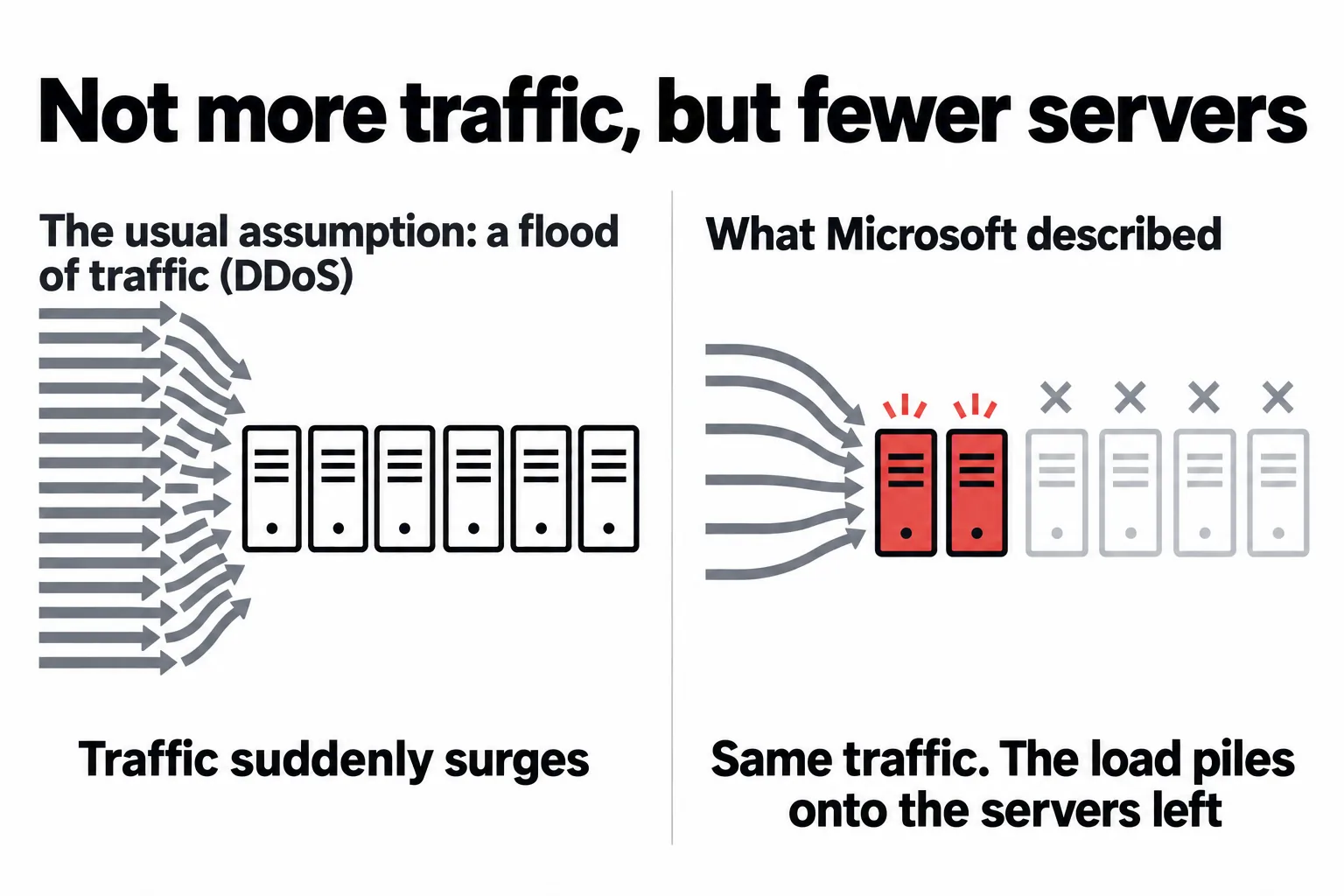
The servers dropped out because they failed automatic health checks. In the cloud, health checks find servers that are not doing well and automatically remove them from the pool receiving work. Normally this is an important mechanism that keeps work from being sent to broken servers.
A supermarket checkout analogy makes this easy to follow. When checkouts judged "not doing well" close one after another, customers line up at the ones that remain. The remaining checkouts cannot clear the queues and stall, and they get closed too. The fewer checkouts that are open, the more customers pile onto the rest. What happened on Microsoft's servers this time is the same vicious circle.
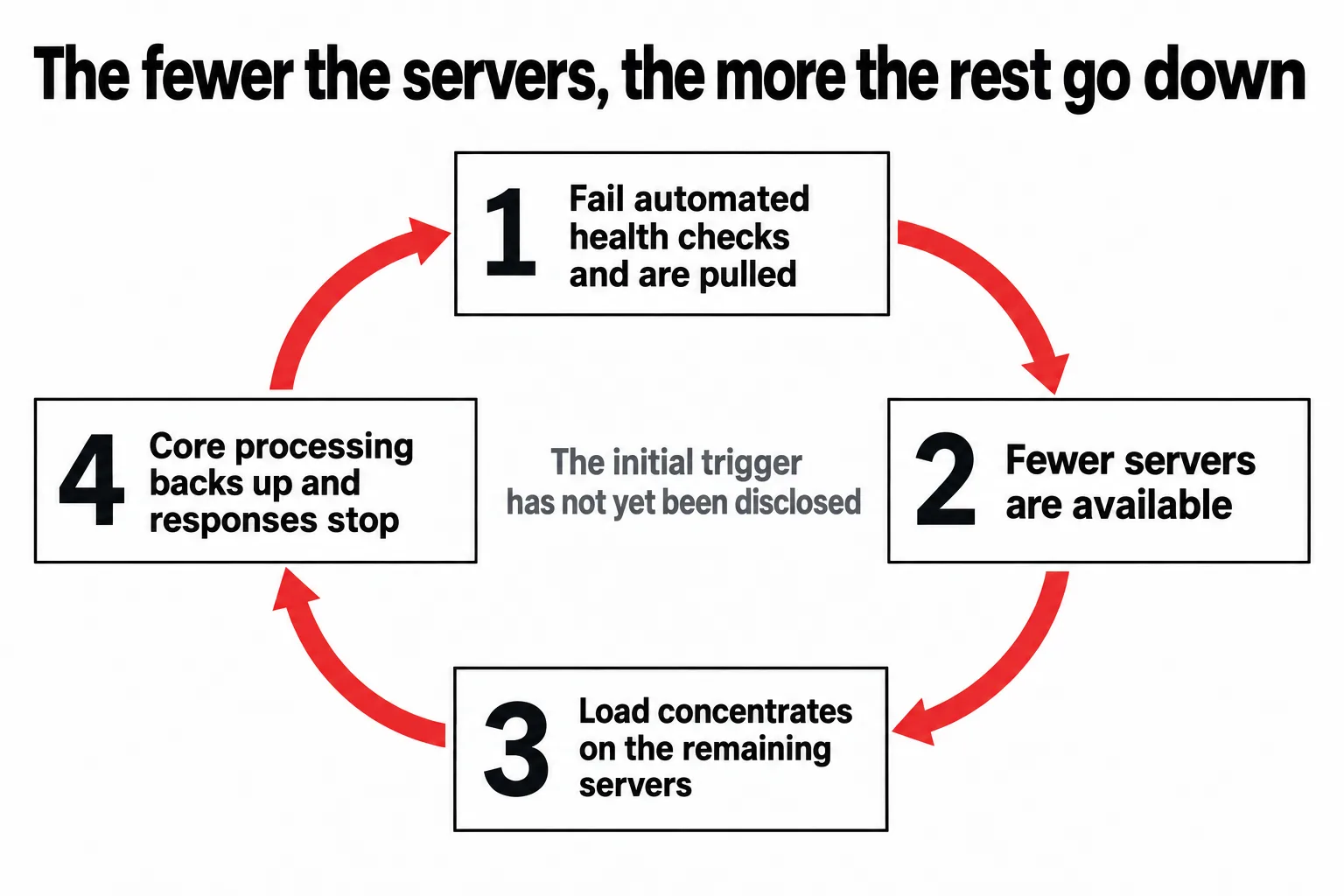
This chain reaction is well known in cloud operations. Google's published operations handbook (the SRE book) calls it a "cascading failure": when one place goes down, the load shifts elsewhere, which overflows and goes down too. It also warns that the mechanism that removes unhealthy servers based on health checks can sometimes get in the way of recovery.
[Update 10:40 a.m.] At 10:06 a.m., Microsoft said that on the affected servers, the process that sets up encrypted, secure connections (the process by which a user's device and a server start communicating in a way that cannot be eavesdropped on) was overwhelmed, and the servers could no longer handle requests. It will try a configuration change to fix that on some servers before extending it. It also began rolling back a recent network configuration change whose timing matches the start of the outage. However, Microsoft says only that the timing matches; it has not yet said the change was the cause.
There are still things we do not know this time. Did the servers stop because they failed health checks, or did they fail health checks because their processing had gone wrong first? The health checks may have wrongly removed healthy servers, or they may have correctly spotted servers that truly could not run. What happened first of all has not yet been made public.
04Microsoft revised its assessment at 4:18 a.m. and changed its recovery approach at 7:03 a.m.
Microsoft's response moved from re-routing traffic, to halting changes, to reviewing the health-check mechanism, and at 7:03 a.m. it switched to isolating part of the infrastructure and bringing it back gradually. At 7:58 a.m., limited recovery was reported in some regions, but at 8:59 a.m., it was reported that servers that had been brought back stop responding again. In the timeline below, as it comes into view, the gaps between events are scaled to real elapsed time, and events appear in order from 1:17 a.m.
1:17
The Outlook (Exchange Online) outage begins
Mailboxes become unreachable. Affected: connections from the web version, desktop apps, smartphone email and other systems. Just before, from 11:45 p.m. on November 12 to 12:53 a.m. on November 13, there was a separate Teams outage (provisional cause: contention for resources; its relationship to this outage has not been confirmed)
2:45
Errors found in part of the mechanism that accepts connections
Begins collecting traffic logs and investigating the cause
3:19
Load rises, not limited to any particular region
Considers restarting servers or re-routing to other infrastructure
3:26
Records it as an outage across Microsoft 365
Acknowledges impact on Teams, SharePoint, Copilot and Defender XDR (incident number MO1550821)
3:43
Servers drop out intermittently, and the load piles onto the rest
Re-routes Outlook connections to infrastructure around the world
4:06
Halts new deployments and configuration changes
To keep the outage from spreading and narrow down the candidate causes
4:18
Revises its assessment: "traffic did not increase"
Explains that many servers suddenly became unusable and the load is concentrating on the servers that remained
4:43
Finds that servers are failing automatic health checks and being removed
Changes the settings of the related components and restarts them to check
4:58
Begins to suspect the health-check mechanism itself
Finds no recent change whose timing matches, and tries a change that bypasses health checks in some places. Also investigates why CPU usage spikes
5:38
Many servers do not respond
Tries to apply fixes, but the target servers do not respond. Proceeds while restarting them
5:56
With a different kind of health check, some servers come back
Extends the measure and prepares a mechanism that automatically restarts servers that stop responding
6:31
Considers rolling back a small number of recent configuration changes
7:03
Changes the recovery approach
Reports that the measures so far did not have the expected effect. It was found that the servers' core processing overflows and responses stop. It will completely isolate part of the infrastructure, restart it, and then return traffic gradually. It is also considering isolating by region
7:58
Limited recovery in some regions
Reports that some servers have come back and are now stable. It moved traffic to another route and is trying to adjust the volume flowing through one location. Recovery is expected to proceed gradually as users' devices reconnect. The cause is unconfirmed
8:59
Servers that were brought back stop responding again once they receive traffic
While investigating the cause, it is narrowing the types of incoming traffic in some places, to check whether a particular type of request is involved. It is rebuilding some servers with the previous software configuration to test them. The next update is at 10:00 a.m.
9:45
Revises its list of what is affected. It narrows to features that exchange data with email
Explains that features that exchange data with email (Exchange Online) are affected and that the rest is working. Teams chat and online meetings are mostly usable, and files placed in SharePoint can be opened. On the other hand, Safe Links, which checks that links are safe, may not be working. The original cause is still under investigation
10:06
Learns how the servers stop. The process that sets up encrypted connections was overwhelmed
On the affected servers, the process that sets up encrypted, secure connections was overwhelmed and the servers could not handle requests. It will try a configuration change to fix this on some servers, then extend it together with restarts. It also began rolling back a recent network configuration change whose timing matches the start of the outage. The next updates are at 11:00 a.m. (Outlook) and 11:30 a.m. (Microsoft 365 overall)
10:45
Restart shows promise. It will extend the fix while confirming stability
Reports good results from restarting the affected infrastructure. It will extend the fix while watching whether the servers it brought back stay stable. This is not an announcement of full recovery. The next updates are at 11:30 a.m. (Microsoft 365 overall) and 12:00 p.m. (Outlook)
11:09
Adds infrastructure capacity to support the regions that are coming back
Reports it is adding infrastructure capacity wherever it can, to support traffic in the regions that are coming back. While watching the results, it is looking for ways to improve all regions. This is not an announcement of full recovery. The next updates are at 12:00 p.m. (Microsoft 365 overall) and 12:30 p.m. (Outlook)
11:54
The changes it made are not working as expected
Reports that, on watching how the changes it made to improve the service were behaving, they are not working as expected. While the uneven distribution of traffic continues, it is looking for another way to add capacity. The next updates are at 12:30 p.m. (Microsoft 365 overall) and 1:00 p.m. (Outlook)
12:48
"No signs that it was caused by a malicious attack"
Reports that it is re-examining traffic flows and infrastructure to deal with the continuing uneven distribution of traffic, and looking for ways to improve routing. It said it will confirm why servers stopped and make concrete the steps to stabilize them. The next update is at 1:30 p.m.
13:10
Part of the service comes back in the region where it intervened, but does not stay back
Reports that it adjusted traffic rules, re-routed traffic, and blocked specific traffic, and that part of the service came back in the region where it intervened. But it did not stay back, and it is considering additional steps to stabilize the infrastructure as a whole. The next updates are at 2:00 p.m. (Microsoft 365 overall) and 2:30 p.m. (Outlook)
13:56
Calls to backend servers surge. Fixes cannot be applied to frozen machines
Reports that calls from the load-balancing system to backend servers are surging, and that they have also increased because traffic was re-routed for recovery. It is adding virtual machines to lower the load and trying to force a recent network change onto machines that are not doing well, but the machines are frozen and cannot take it. The next updates are at 3:00 p.m. (Microsoft 365 overall) and 3:30 p.m. (Outlook)
14:43
Investigates why the calls surged, and identifies and repairs machines
Reports that it is running several efforts in parallel, to pin down why calls to backend servers surged and to recover the backend servers (Outlook). It is carefully identifying and repairing affected machines, which makes it easier to confirm whether the change has been applied. Its statement that there are no signs of a malicious attack is unchanged. The next update is at 4:00 p.m.
15:14
Considers traffic controls to rebuild the front-end servers
Reports that, to raise the capacity and stability of the front-end servers, it is considering traffic controls such as throttling the volume, adjusting traffic rules, and switching to other regions (Microsoft 365 overall). It is also expanding testing in a closed environment and improving traffic monitoring and ways of detecting problems. Its statement that there are no signs of an attack is unchanged. This is not an announcement of full recovery. The next update is at 4:00 p.m.
15:54
After restarts, it checks whether the fix is working. A slight improvement
Reports that it is watching servers region by region and deciding how to raise capacity. After restarting infrastructure, it is checking whether the fix it built was applied and is working as intended, and so far has seen a slight improvement. In parallel, it is adding capacity with virtual machines. At 3:16 p.m., it added to its impact description that email running on in-house servers may be affected if it exchanges mail with Exchange Online. Its statement that there are no signs of an attack is unchanged. This is not an announcement of full recovery. The next update is at 4:30 p.m.
16:24
The fix shows promise on some infrastructure. It will extend it to other servers
Reports that after applying a fix to upstream components involved in authentication and routing settings, there are good results for server stability on part of that infrastructure. While watching, it is extending the fix to the servers that support regions currently in operation. Its statement that there are no signs of an attack is unchanged. This is not an announcement of full recovery. The next update is at 5:30 p.m.
17:06
Confirms stability with the fix, and extends it starting with regions in business hours
Reports that server stability was confirmed on the infrastructure where the fix to components involved in authentication and routing settings was applied. It has begun extending the fix to other infrastructure in turn, giving priority to infrastructure supporting regions now in business hours and those about to enter them. It is also building additional changes to further improve stability and capacity. Its statement that there are no signs of an attack is unchanged. This is not an announcement of full recovery. The next update is at 6:00 p.m.
18:05
Signs of stability. The period for delivering delayed email is extended to 48 hours
Reports that signs of stability have begun to appear on the affected infrastructure (Microsoft 365 overall). But capacity has not yet returned to normal levels, and because traffic is being returned carefully, conditions vary. It is cycling through infrastructure one unit at a time: draining traffic, restarting, repairing, and returning traffic in stages. To avoid losing delayed email, it extended the period during which it keeps trying to deliver to 48 hours. Its statement that there are no signs of an attack is unchanged. This is not an announcement of full recovery. The next update is at 7:00 p.m.
18:57
Recovery proceeds in stages, with gradual improvement in some functions
Reports that it is carrying out recovery in stages on the affected infrastructure (Microsoft 365 overall). According to overall measurements and reports from users, some functions are improving gradually. But conditions vary, and capacity has not yet returned to normal levels. To protect delayed email, the 48-hour period for trying to deliver it continues. It says there is no evidence of malicious activity. This is not an announcement of full recovery. The next update is at 8:00 p.m.
19:26
Consumer Outlook.com and OneDrive are also affected
Announces on the Microsoft 365 consumer status page that Outlook.com, OneDrive, OneNote, Microsoft To Do, Teams and the web version of Microsoft 365 may be unavailable, or that some operations may not work. It says other services may also have problems. It is working in parallel to identify the cause and to recover. The page does not say how this relates to the business outage (MO1550821). The next update is at 9:30 p.m.
20:01
Recovery work finishes in part of Asia-Pacific. Mailbox connections improve
Reports that recovery work has finished on part of the infrastructure in Asia-Pacific regions (Outlook and Microsoft 365 overall). It is returning traffic gradually, and mailbox connections and the processing of delayed email are improving. But some people still have intermittent problems. It will now extend the same work to infrastructure in other regions. The 48-hour period for delivering delayed email continues. It says there is no evidence of malicious activity. This is not an announcement of full recovery. The next update is at 9:00 p.m.
20:55
Recovery progresses for consumers too
Reports on the consumer status page that recovery is progressing across the affected environment. In parallel, it continues work to identify the cause. Covers Outlook.com, OneDrive, OneNote, Microsoft To Do, Teams and the web version of Microsoft 365. This is not an announcement of full recovery. The next consumer update is at 11:30 p.m.
21:00
"Japan is relatively stable." Europe and North America improve too
Reports that recovery is progressing in Europe, and that service availability and email delivery speed are improving across a wide range of the affected infrastructure (Outlook 9:00 p.m., Microsoft 365 overall 9:18 p.m.). It says Japan is relatively stable and North America is also improving. But while recovery work continues, some people still have intermittent problems. The 48-hour period for delivering delayed email continues. It says there is no evidence of malicious activity. This is not an announcement of full recovery. The next update is at 10:00 p.m.
21:59
Recovery continues in North America, Europe and Asia-Pacific
Reports that recovery is continuing in the affected regions (Microsoft 365 overall 9:59 p.m., Outlook 10:00 p.m.). It says improvement has spread in North America, continues in much of Europe, and there are signs of recovery in Asia-Pacific. But while repairs to the remaining infrastructure proceed, some people still cannot connect intermittently, and some people's email is delayed. It is concentrating on stabilizing the infrastructure that has come back, finishing repairs on the rest, and reducing the pile of delayed email, and is confirming recovery by connection method. This is not an announcement of full recovery. The next update is at 11:00 p.m.
23:01
The backlog of email shrinks greatly and nears normal levels
Reports that service availability continues to improve, and that the backlog of email has shrunk greatly and is nearing normal levels (Outlook and Microsoft 365 overall). But some people still cannot connect intermittently, and some people's email is delayed. It is investigating the remaining problems while applying additional measures and bringing the remaining infrastructure back. It says there is no evidence of malicious activity. This is not an announcement of full recovery. The next update is at 12:00 a.m. on the 14th
23:10
For consumers, resolution may still take time
Reports on the consumer status page that recovery work continues and resolution may still take time. It continues work to identify the cause. The next update is at 1:30 a.m. on the 14th
23:55
Improvement continues. Focus shifts to the remaining problems
Reports that service availability continues to improve across the affected Microsoft 365 services (Microsoft 365 overall 11:55 p.m., Outlook 11:57 p.m.). But some people still cannot connect intermittently, and some people's email is delayed. It is shifting its focus to resolving the remaining problems and restoring stable service for all users, and is confirming recovery by connection method. It says there is no evidence of malicious activity. This is not an announcement of full recovery. The next update is at 1:00 a.m. on the 14th
0:40
Signs of recovery for Claude's Microsoft 365 connector too
On its status page, Anthropic reports signs of recovery for the Microsoft 365 connector and Claude for Outlook. But some SharePoint searches still return errors. It says errors may return because Microsoft's outage has not been closed. OpenAI's status page still says it is investigating
0:52
Clearing the "remaining impact." The next update is two hours away
Reports it is concentrating on clearing the remaining impact and restoring service reliably (Microsoft 365 overall 12:52 a.m., Outlook 12:53 a.m.). It is confirming recovery by connection method and watching whether stability holds. The next update is at 3:00 a.m., two hours later, instead of the hourly updates so far. It says there is no evidence of malicious activity. This is not an announcement of full recovery
1:24
Signs that recovery continues for consumers too
Reports on the consumer status page that signs of continuing recovery are visible across the affected environment. It continues to investigate the cause and is watching whether the service stays stable. Covers Outlook.com, OneDrive, OneNote, Microsoft To Do, Teams and the web version of Microsoft 365. This is not an announcement of full recovery. The next consumer update is at 3:30 a.m.
2:57
Microsoft apologizes and explains the cause. Not an attack, and nothing to do with AI
Expresses deep apology for the impact of the outage on users and businesses (Outlook and Microsoft 365 overall). Says the service as a whole has broadly recovered and stabilized. Explains the cause as a problem in earlier network capacity expansion work that came to the surface after a recent network change, a technical problem unrelated to cyberattacks or to AI and agents. It has dealt with the underlying problem and is restoring service to the remaining users and regions. It said that because of the size of demand, it restored service little by little, confirming stability at each stage, which is why it took time. It will issue a post-incident report once its review is complete. This is not an announcement of full recovery. The next update is at 5:00 a.m.
3:57
The same apology and explanation of the cause for consumers
Its consumer status page also issued the same apology and explanation of the cause as the 2:57 a.m. update for businesses. So the outages of consumer Outlook.com, OneDrive and other services were also triggered by a problem in earlier network capacity expansion work. It says service has broadly recovered and stabilized, and it is restoring the remaining users and regions. This is not an announcement of full recovery
5:03
Access returns first, and email delivery catches up later
Reports on the consumer status page that, as the infrastructure stabilizes, it is flushing backed-up email and re-routing traffic. As a result, even when sign-in and access improve, email delivery and processing may catch up later. There is still no outlook for full recovery. The next consumer update is at 9:00 a.m.
5:01
For businesses too, no timeline yet for full recovery
For businesses (Microsoft 365 overall 5:01 a.m., Outlook 5:02 a.m.), it issued the same explanation as for consumers. As the infrastructure stabilizes, it is flushing backed-up email and re-routing traffic. Sign-in and access return first, and email delivery and processing may catch up later. There is still no outlook for full recovery. The next update is at 9:00 a.m.
6:49
Anthropic marks the outage of Claude's Microsoft 365 connector as resolved
On its status page, Anthropic marked the outage of Claude's Microsoft 365 connector and Claude for Outlook as resolved. It said the email, calendar and search tools had been returning errors for many requests from 1:03 a.m. on the 13th to 1:40 a.m. on the 14th (JST)
7:00
Recovery continues. Because of the size of the impact, extended monitoring
Reports that recovery is continuing in the affected environment (Outlook and Microsoft 365 overall). Because the impact was large, it is watching longer to see whether additional measures are needed. It will also call the incident resolved only after confirming that all email that piled up during the outage has been processed. For Microsoft 365 overall, it says it has taken action on most of the impact to related products. This is not an announcement of full recovery (resolution). The next update is at 11:30 a.m.
9:39
Extended monitoring for consumers too
Reports on the consumer status page that recovery is continuing in the affected environment and that it is watching for longer until it can say everything is fixed. It will call the incident resolved only after confirming that all email that piled up during the outage has been processed. This is not an announcement of full recovery (resolution). The next consumer update is at 11:00 a.m.
10:51
Recovery continues for consumers too11:20 a.m. update
Reports on the consumer status page that recovery is continuing. Until it can say everything is fixed, it will keep watching the state of the service and the processing of backed-up email. The next consumer update is at 1:00 p.m.
11:13
Confirms recovery is continuing. No announcement of resolution yet11:20 a.m. update
Reports that it has confirmed recovery is continuing in the affected environment (Outlook). It will keep watching whether the measures it took keep working and the processing of backed-up email. It has taken action on most of the impact to related products and continues work on the rest. This is not an announcement of full recovery (resolution). The next update is at 1:30 p.m.
The red marks are the turning points. At 3:26 a.m. the outage spread to Microsoft 365 as a whole; at 4:18 a.m. the "traffic increased" theory was set aside; and at 7:03 a.m., saying the measures so far were not working, Microsoft changed the recovery approach itself. At 7:58 a.m. signs of recovery appeared, but at 8:59 a.m. it became clear that servers brought back stop responding again once they receive traffic, and Microsoft began trying to rebuild servers with the previous software configuration.
05The tools that watch for attacks, and the services ChatGPT and Claude connect to, were also affected
What makes this outage serious is not only that email was unavailable. Business services on the same foundation, security tools, and even AI outside Microsoft all found it harder to finish work. The figure below can be zoomed and panned, and pressing a numbered button under the figure makes that spot glow red and grow larger. Pressing "Step through" animates the five tiers in turn.
AI outside Microsoft was affected too. OpenAI reported problems with new connections and tool execution in ChatGPT's Microsoft 365 connector. Anthropic also reported that most email, calendar and search requests through Claude's Microsoft 365 connector were failing and that Claude for Outlook was affected, and stated plainly that the cause was the Microsoft 365 outage.
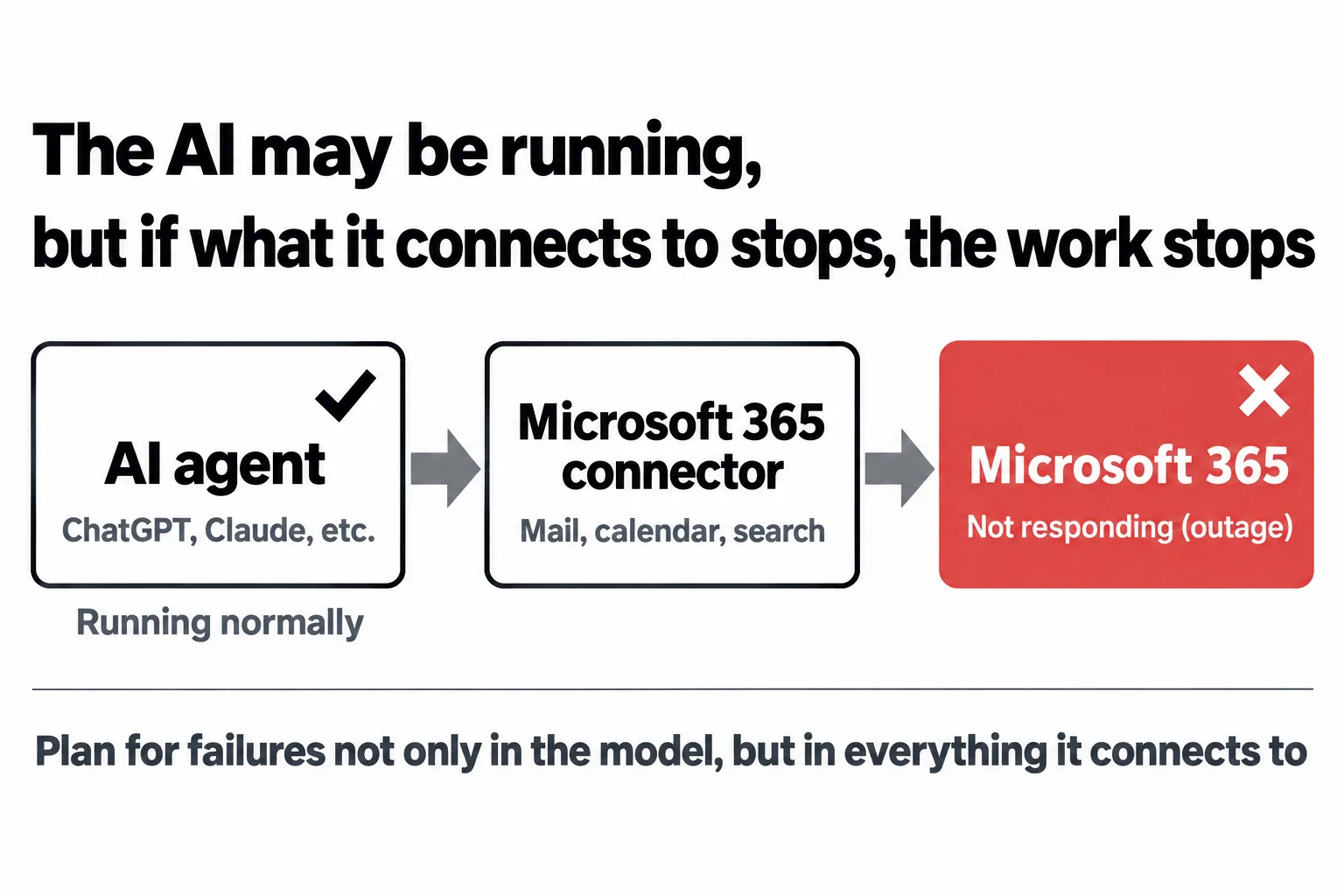
What stopped was not the AI itself but what the AI connects to. However normal an AI agent is, work does not get finished if the place where email and files are kept does not respond. If you build AI agents into your work, you need to decide in advance what to do when they stop, not only whether the AI runs but also including what it connects to and the authentication and data paths it relies on.
[Update 10:10 a.m.] In the 9:45 a.m. revision, Safe Links (Defender for Office 365), which checks whether links in email and Teams are safe before you open them, was said to possibly be unable to check links. During the outage, take more care than usual before opening links that have arrived.
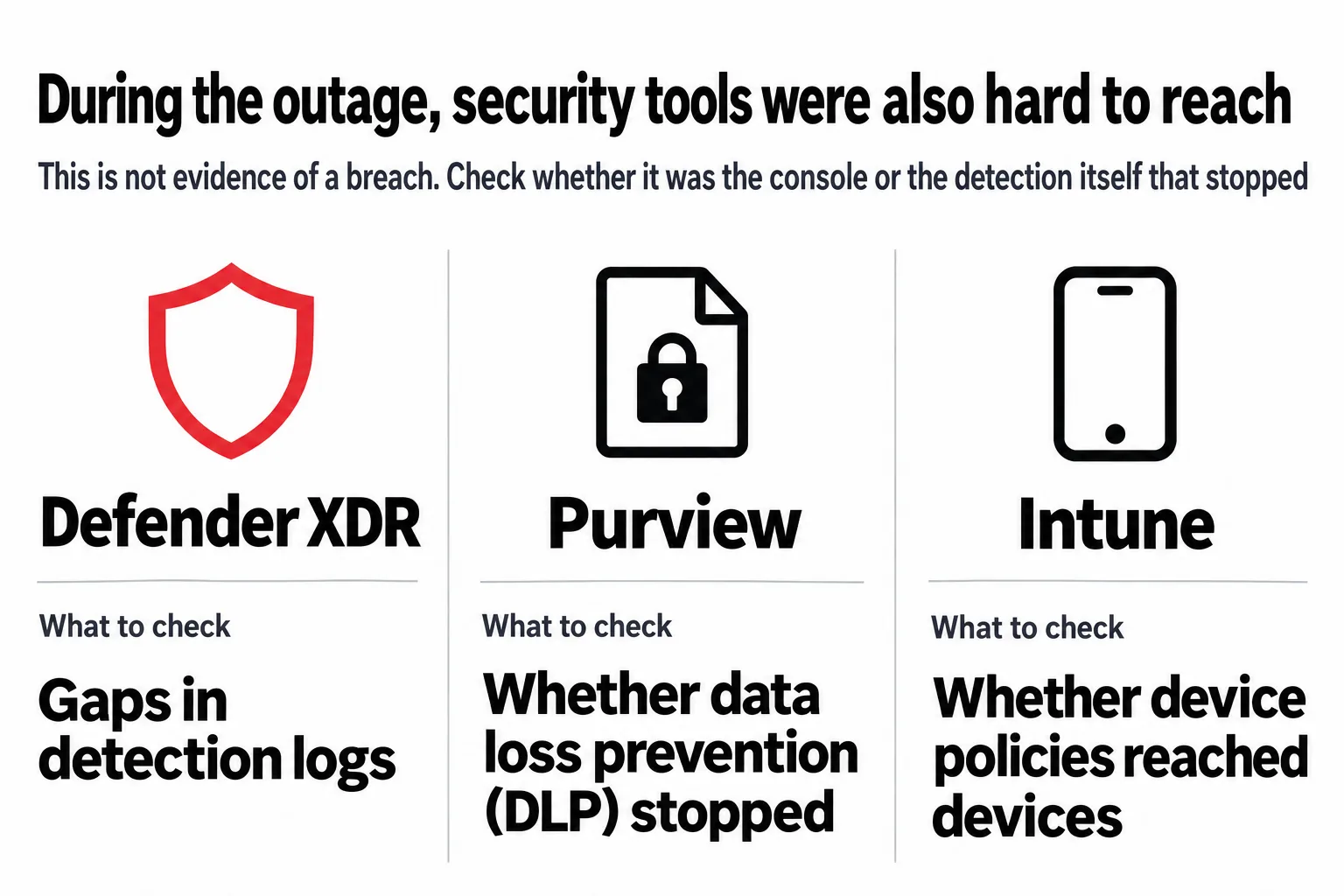
We should also look at the fact that security tools were hard to reach. Defender XDR and Purview being affected is not evidence of an attack. But a company that could not use its monitoring screens, data-loss prevention or administrative operations during the outage may have had a temporary gap in its defenses.
06It was not an attack. Microsoft says a problem in network work was the trigger
[Update 3:15 a.m.] Microsoft explained at 2:57 a.m. on November 14 that the outage was "a technical problem unrelated to cyberattacks or to AI and agents." It said the trigger was a problem in earlier network capacity expansion work that came to the surface after a recent network change. The assessment below in this section reflects the situation up to that point.
[Update 1:10 p.m.] In its 12:48 p.m. update, Microsoft said "there are no signs that it was caused by a malicious attack." This is the first time since the outage began that Microsoft has spoken about an attack.
To put it plainly, nothing in the information now public shows that an attack was the cause. SecurityWeek, a U.S. security news outlet, also reports that no evidence of an attack has been presented. However, because the original cause is still unknown, the possibility of an attack has not been ruled out either.
| What it could be | How it fits with what is known now | Assessment |
|---|---|---|
| An attack that overwhelms with massive traffic (DDoS) | Microsoft explains that an increase in overall traffic was not the cause | Not supported |
| An attack that targets a particular heavy operation to use up resources | Technically not inconsistent with the CPU spikes and the stalled responses | Not confirmed |
| Someone broke in and rewrote settings | Configuration changes are being examined, but there are no reports of unauthorized operations | No evidence |
| A software bug or a configuration error | Fits with the investigation of recent configuration changes and with some workarounds having worked. At 10:06 a.m., Microsoft began rolling back a network configuration change whose timing matches | A leading candidate, but not confirmed |
| A chain reaction between health checks and server load | Microsoft has explained the concentration of load and the overflow of core processing | Fits as an explanation of how it spread. What came first is unconfirmed |
One caution: an attack that targets only a particular heavy operation may not greatly raise overall traffic. In its 8:59 a.m. update, Microsoft said it is narrowing the types of traffic to check whether a particular type of request is involved in the outage. It did not describe this as an attack, and it would check the same way for a software bug. Even so, we cannot go as far as to say "traffic did not rise, so it was not an attack."
07Health checks have spread outages at AWS and Azure too
Major outages in which health-check mechanisms or configuration changes set off a chain reaction have happened in other Microsoft clouds and in other companies' clouds.
| When | Where | What happened |
|---|---|---|
| October 2025 | AWS (U.S. East region) | A fault in database name resolution was the starting point. Load-balancer health checks repeatedly removed and restored healthy servers, and automatic failover lost capacity, setting off a chain reaction. About 14.5 hours. It subsided when the automatic failover was stopped |
| January 2026 | Microsoft 365 (North America) | Part of the foundation stopped processing, and a load-balancing configuration change meant to restore it quickly made the imbalance worse. About 10 hours |
| September 2026 | Azure (Sweden) | A deployment erased temporary storage, and requests to backend mechanisms rose about 20-fold. Health checks set off a loop of repeated restarts |
The design guidance AWS publishes warns that if health checks are made too strict, all servers can be removed at once and a small fault can turn into a total outage. Whether the same mechanism was at work this time must wait for Microsoft's report on the cause.
08What companies should do, in three stages: today, after recovery, and in normal times
Because this is an outage on Microsoft's side, much of what a company can do today is keep records so that it is not left struggling after recovery.
Today
- In the Microsoft 365 admin center, check what impact your own environment (tenant) is actually seeing
- Record the email, Teams and SharePoint work that failed during the outage, and any settings you changed or stopgap measures you took
- Decide on a way to reach people urgently that does not rely on Microsoft products, and tell everyone in the company
After recovery
- Check for gaps in the records of Defender XDR and Purview, in data-loss prevention (DLP) processing, and in detection history. Separate whether only the admin screens stopped, or the monitoring and detection themselves
- Reconcile processing that was delayed, processing that was duplicated, and data that was never sent
- When you rerun AI agents or automated processes, make sure the same email is not sent twice and the same update is not applied twice
An example of a notice to send to employees:
There is an ongoing outage on Microsoft's side affecting Microsoft 365 (Outlook, Teams and others). It is not a problem with your computer or account, so please do not reinstall Outlook or change your password. For urgent matters, please call. Please do not open links in emails that say things like "Please log in again." For email you sent during the outage, please check after recovery that it reached the recipient.
Many companies do not know whether they subscribe to Defender XDR or Purview, or who can view the admin center. In that case, ask the IT vendor you contract with today about the impact, and about what to check after recovery.
In normal times
Know which of your company's tasks depend on which foundation. The figure below is an example of one company.
Email, meetings, files, monitoring, data-loss prevention and AI agents all actually sit on one foundation. If you draw this as a single map in normal times, then on the day it stops you can quickly decide what has stopped, what is still running, and which route will stand in for it.
Disaster news for each company
This article reads the same for everyone
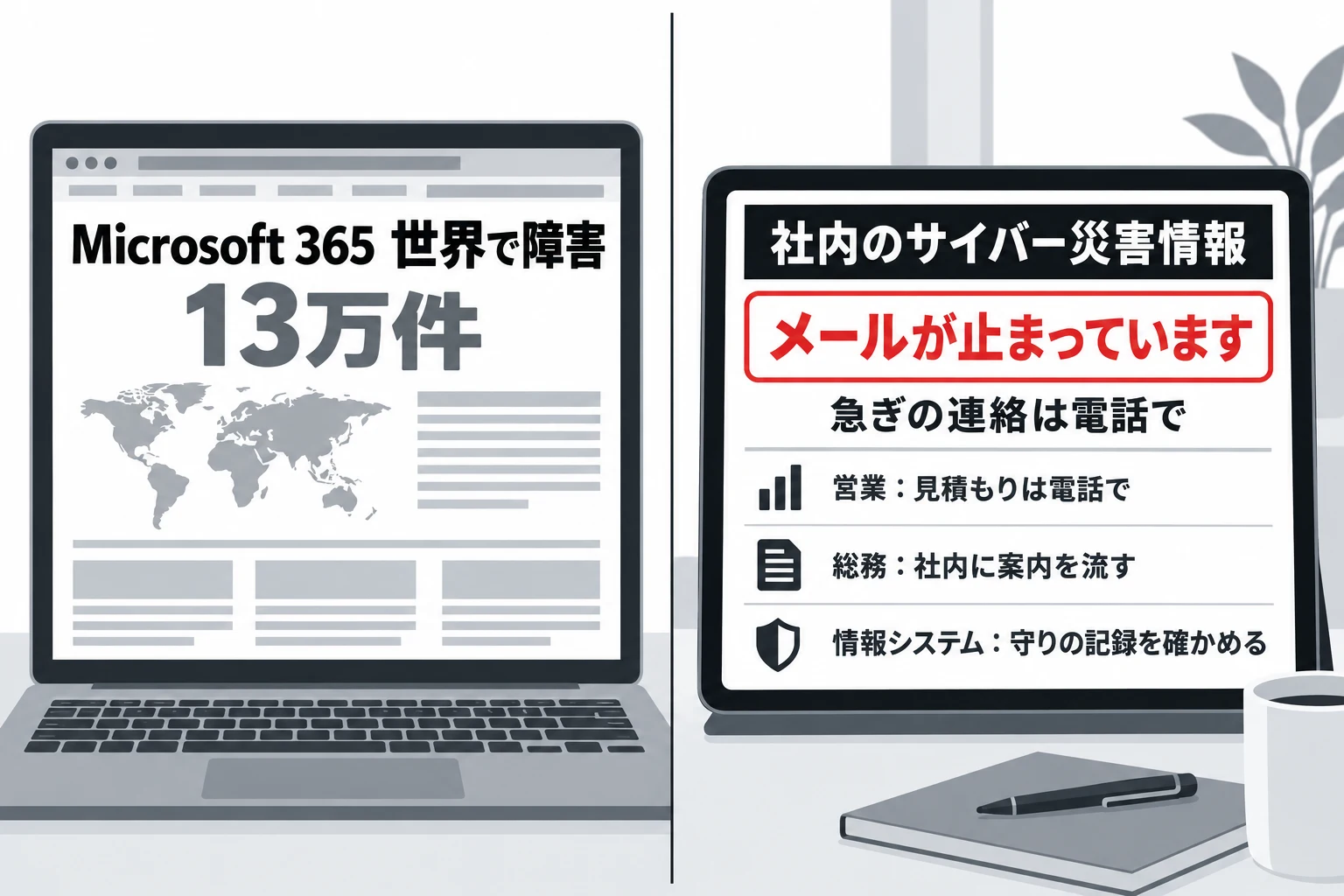
But what stopped at your company, and what each person in sales, the factory and management should do now, differs from company to company. We have begun using agents to make disaster news for each company: checking it against the company's map, writing it separately for each employee, and delivering it by another means.
Try the notice that reaches each employeeFor companies, and for individuals through "My Disaster Preparedness News," we will announce it in our newsletter once we have decided how to start.
Sign up for the newsletter to get word of how to start
You are subscribed to the newsletter
We received . We will notify this address when new films and articles are published. If the confirmation email does not arrive, please check your spam folder.
Emails are sent in Japanese. You can unsubscribe at any time. (Privacy policy)
09The broad cause is known. The detailed post-incident report is still to come
[Update 3:15 a.m.] Microsoft explained at 2:57 a.m. on November 14 that the trigger was "a problem in earlier network capacity expansion work that came to the surface after a recent network change," and said it had nothing to do with an attack or AI. But the detailed account must wait for the post-incident report it will issue after its review. Until then, these are the seven things we want to confirm (left as originally written).
- What was it that first began to make servers fail health checks?
- What was the direct reason the core processing overflowed?
- Was there a relationship between the recent configuration changes and the start of the outage?
- Did the routing of traffic across regions, or a shared foundation, make the outage bigger?
- Were suspicious traffic, permission operations or traces of intrusion that point to an attack found?
- Did the monitoring and information protection of Defender XDR and Purview actually develop gaps?
- When did full recovery come, how many companies were affected, and what will prevent the same thing?
The detailed post-incident report that would let us confirm these has not yet been issued. [Update 11:20 a.m.] Microsoft gives its next updates as 1:00 p.m. JST on November 14 for consumers and 1:30 p.m. for businesses. If there is a new announcement, we will update this article.
About this article
Compiled by the Data is CITY Media editorial team from the outage records Microsoft has published (a copy published by the University of Pennsylvania), the status pages of Microsoft, OpenAI and Anthropic, and Japanese and international press reports. The information is as of 11:42 a.m. JST on November 14, 2026. The updates every 30 minutes ended at 11:30 a.m. on November 14. For announcements after that, please check Microsoft's service status and incident records in the references below. The outage is ongoing and the cause has not been confirmed. All times have been converted to Japan time (the times in the original incident-record copy are in Coordinated Universal Time). Reuters and AP articles were checked against their publication on syndication sites. Past examples are based on each company's post-incident reports and press coverage.
References
- Microsoft incident records (EX1550543, MO1550821, TM1550488 and PP1550869; a copy published by the University of Pennsylvania)https://mailservices.isc.upenn.edu/computing/email/penno365/alerts/ms-incidents.html
- Microsoft, "Microsoft 365 service status"https://status.cloud.microsoft/
- Microsoft, "Azure status"https://azure.status.microsoft/ja-jp/status
- OpenAI “Status”https://status.openai.com/incidents/01M78GAT3AK9P9W8Z230KHFVE8
- Anthropic “Claude Status”https://status.claude.com/
- Nikkei (November 13, 2026)https://www.nikkei.com/article/DGXZQOGN12CY20S6A111C2000000/
- Asahi Shimbun (as carried by Yahoo! News Japan; November 13, 2026)https://news.yahoo.co.jp/articles/d2db8300ba543f40f0228994c065f5f28dbdb002
- ITmedia NEWS (November 13, 2026)https://www.itmedia.co.jp/news/article/2611/13/2000003161/
- Reuters (as carried by a syndication site; November 12, 2026)https://wtvbam.com/2026/11/12/microsoft-365-outlook-down-for-thousands-of-us-users-downdetector-shows/
- AP (as carried by a syndication site; November 12, 2026)https://www.news4jax.com/tech/2026/11/12/is-outlook-down-widespread-outage-hits-microsoft-email-and-other-apps/
- SecurityWeek https://www.securityweek.com/microsoft-365-outage-disrupts-outlook-exchange-online-and-teams/
- CP24 (Toronto hospital; November 12, 2026)https://www.cp24.com/local/toronto/2026/11/12/code-grey-declared-at-toronto-hospital-network-amid-microsoft-outage/
- ABC News (Australia; November 13, 2026)https://www.abc.net.au/news/2026-11-13/microsoft-outage-affects-users-worldwide/107381050
- Google “Site Reliability Engineering: Addressing Cascading Failures”https://sre.google/sre-book/addressing-cascading-failures/
- AWS, "Summary of the Amazon DynamoDB Service Disruption in the Northern Virginia (US-EAST-1) Region" (October 2025)https://aws.amazon.com/message/101925/
- AWS Builders' Library “Implementing health checks”https://builder.aws.com/content/3Ev53O39izHCtWLzp4XU6t8PC1O/implementing-health-checks
- Microsoft, "Azure status history" (the September 29, 2026 incident)https://azure.status.microsoft/en-us/status/history/
- The Register (Microsoft 365 outage of January 2026; January 23, 2026)https://www.theregister.com/2026/01/23/microsoft_365_outage/